


Online Business banking
You have even more ways to do your banking with Business+ online.
Fantastic features for faster payments
Digital Wallets
Leave your wallet at home. Use your phone or wearable device to tap and pay.
More features, less fuss.
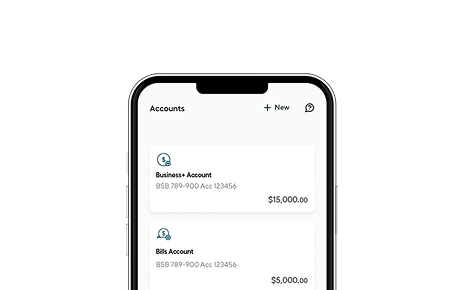
Banking, finance and invoicing in the Business+ app.



Frequently asked questions
Everything you wanted to know about online banking and our mobile apps.
Business+ online is accessed on the Great Southern Bank website under the ‘login’ button and is designed for use on a desktop or laptop computer.
The Business+ app gives you the best experience on your phone. You can download the app from the Apple App Store or get it on Google Play.
Visit the Great Southern Bank website, go to the ‘login’ button and select ‘Business+ online’. Then, choose ‘Sign up’ and follow the prompts.
If you're already a Business+ customer there’s no need to register again. Just login, using your Business+ customer number and your password.
You can download the Business+ app from the Apple App store or Google Play. Scan the QR code above to go straight there.
Great Southern Bank is the trading name of Credit Union Australia Limited. You may have previously known us as CUA.
For over 75 years we’ve helped our customers manage their money. We do this by providing clever products and smart tools that help you reach your financial goals sooner. Plus, being customer-owned means that our profits go back into our products and services, not shareholders.
We love helping people reach their financial goals and we can’t wait to help you reach yours, whatever they may be. Jump on Business+ online or download our Business+ app to get started.
When you take the necessary steps to stay safe online and protect your device from theft, you're covered for fraudulent transactions under the ePayments Code for digital banking.
While we’re proactive in fighting fraud, you can help us stop fraudsters and stop scammers in their tracks. Check out our top tips on how you can protect your accounts.
- Log in with your customer number and password
- Enter the code sent to your registered mobile number
- Set up your new PIN
You’ll be prompted to set a Passcode when you log in on any registered mobile device for the first time.
Your ‘how to’ guide to Business+
Explore more about Small Business Banking
Check out these clever tips and tools to help your business thrive.
Getting Paid on Time with Business+
Getting paid on time is a challenge faced by most small business owners. Learn how to minimise the problem here.
Read moreHow to keep track of your business expenses
Keeping on top of your business expenses is vital to help you better manage your small business cashflow and budget. Stay on top of it with our Business app.
Read moreGreat Southern Bank, a business name of Credit Union Australia Ltd ABN 44 087 650 959, AFSL 238317. Conditions, fees and charges apply. This is general information and does not consider your objectives, financial situation or needs. Consider the appropriateness of the information, including the Business Banking Terms & Conditions (T&Cs), before acting on it. Lending criteria, limits, conditions, and fees apply. Applications are subject to credit approval. A Business+ Unsecured Overdraft and Business+ Unsecured Loan is only available to approved applicants for business purposes. Lending criteria, limits, conditions, and fees apply. Applications are subject to credit approval. An early payout cost may apply if a Business+ Unsecured Loan is terminated during the fixed rate period.
- You must be aged 18 or over
- You must be an Australian resident
- You must be a sole trader or company owned by real people
- ABN for your organisation
- An email and a mobile number
- One form of ID such as your driver's licence, passport, or Medicare card
- Simple, fast, and mobile business banking
- Open accounts and loans entirely online in minutes
- In-app support (from real people)
